
Jun 12th, 2026
Introducing the Visor API
We spend a slightly unreasonable amount of time asking questions about the car market.
Not just "show me Camrys near me," but questions like: how many clean manual F80 M3s are actually left under 60k miles? Are RAV4 Hybrid prices in California still drifting down? Which dealers keep discounting the same new trucks every week? What does the market look like if you care about one very specific option package?
We built Visor because car shoppers should be able to explore those questions on the site. The next obvious step was letting you explore them outside the site, too.
So today we're opening up the Visor API, along with a hosted MCP server for people who would rather talk to an AI agent than write code.
Start with MCP
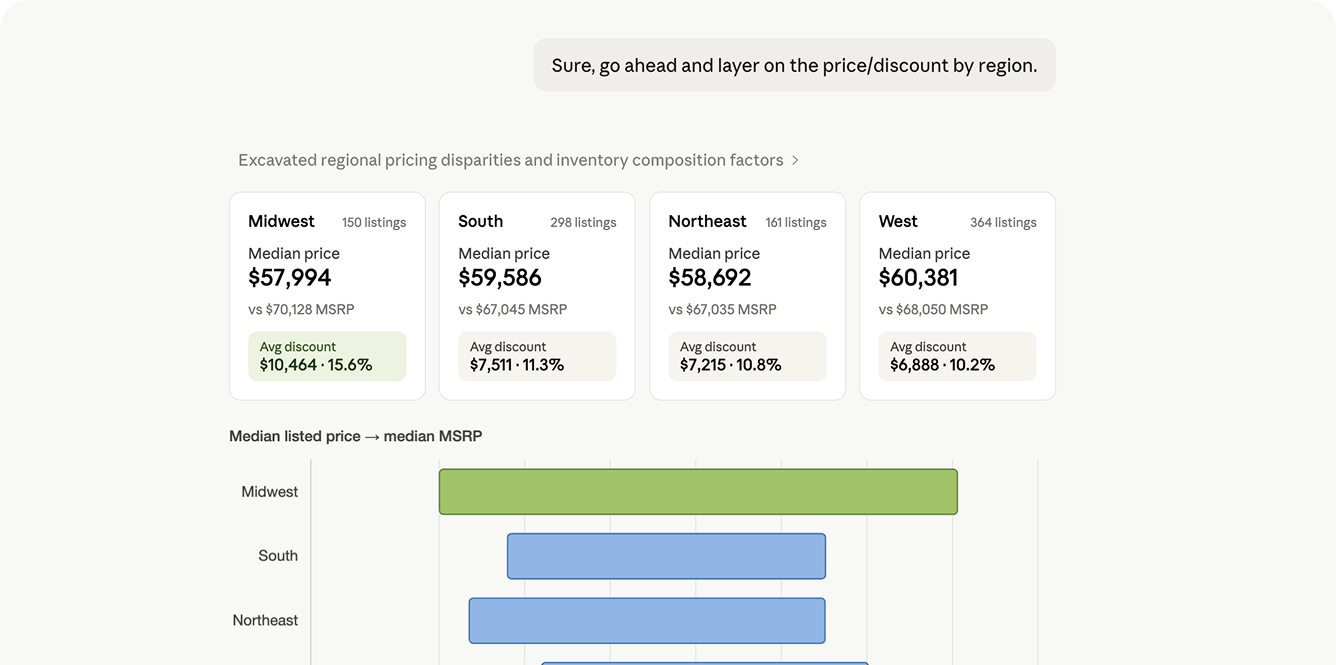
This is probably the most fun way to use it.
If you use Claude, ChatGPT, OpenClaw, Codex, or another MCP-capable client, you can connect the Visor MCP server and explore the car-market in plain English.
Ask things like:
- "What's the median price of a used Toyota RAV4 in California?"
- "Show me the 10 newest Honda Civic Si listings under $35k."
- "Which Ford F-150 trims have the biggest discounts from MSRP right now?"
- "Find sold examples for a 2023 BMW X5 xDrive40i near Atlanta."
- "Compare this VIN against active listings and recent sales."
The agent picks the right Visor tool, runs the lookup, and brings back an answer you can work with. Under the hood, it's using the same public API that developers can call directly.
The MCP server is read-only. It can look up listings, dealers, VINs, prices, options, price history, sold inventory, and market slices, but it cannot change your Visor account. Most apps connect with normal Visor sign-in. If your client prefers bearer tokens, you can use an API key instead.
The hosted MCP server is available at:
https://mcp.visor.vin/mcp
Set up MCP here, or start from the new API page.
For developers
If you do want the raw API, the public beta starts here:
https://api.visor.vin/v1
The first version is focused on the things we reach for constantly inside Visor:
- Search live and historical listings.
- Pull a listing or VIN into a richer detail view.
- Slice the market with facets and counts.
- Look up dealers and their inventory.
- Check usage so you know what you're spending.
If you've used Visor's filters, the API will feel familiar: make, model, trim, year, price, miles, location, inventory type, drivetrain, fuel type, colors, options, features, VIN patterns, sold status, and plenty more. Collection endpoints use limit and offset, return stable data and pagination envelopes, and support fields selections when you want leaner responses.
When you need heavier context, you can ask for things like include=price_history or include=options.
A few things this unlocks
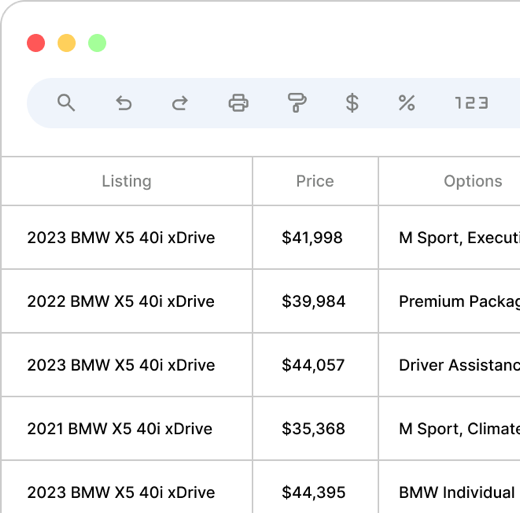
We expect you to surprise us here, but these are the kinds of uses we had in mind:
- Pull nationwide inventory for a painfully specific enthusiast search into a spreadsheet.
- Track the launch of a brand-new model as listings appear across the country.
- Build a broker workflow around active listings, sold examples, and dealer inventory.
- Compare trims, packages, colors, or drivetrain mixes without hand-counting listings.
- Look up a VIN and pull together the latest listing, dealer, photos, options, and price history.
Here's a small listing search:
curl -G https://api.visor.vin/v1/listings \
  -H "Authorization: Bearer vis_live_..." \
  -d make=toyota \
  -d model=camry \
  -d year=2024 \
  -d state=CA \
  -d sort=price \
  -d limit=10
Pricing
The API is usage-based and prepaid during beta. Most common requests cost a fraction of a cent.
New API accounts include starter credit based on your Visor plan.
You can create an API account, make keys, connect MCP clients, add credits, invite team members, view usage, and set spend controls from Account -> API. No credit card is required to start.
A note on the beta
This is a public beta, so we expect the shape to keep changing. The first surface is centered on listings, VINs, dealers, facets, usage, and MCP because those are the parts we think people will actually use first.
There is a lot more we want to add. There are probably also a few things we made too fussy, or not fussy enough. That's usually how first versions go.
If you're technical, start with the API docs. If you want an AI agent that can understand the car market with you, start with the MCP setup guide.